> ## Documentation Index
> Fetch the complete documentation index at: https://docs-dev-docs-free-tenant-inactivity-policy.mintlify.site/llms.txt
> Use this file to discover all available pages before exploring further.

> Learn how to configure a progressive profile form using Forms for Actions

# Use Cases: Configure a progressive profile form using Forms

<Card title="Before you start">
  1. Create a [Machine-to-Machine Application](/docs/get-started/auth0-overview/create-applications/machine-to-machine-apps) with the following scopes enabled:

  * `read:users`
  * `update:users`
  * `create:users`
  * `read:users_app_metadata`
  * `update:users_app_metadata`
  * `create:users_app_metadata`

  2. Add a [Vault connection](/docs/customize/forms/vault) using the M2M application credentials.
</Card>

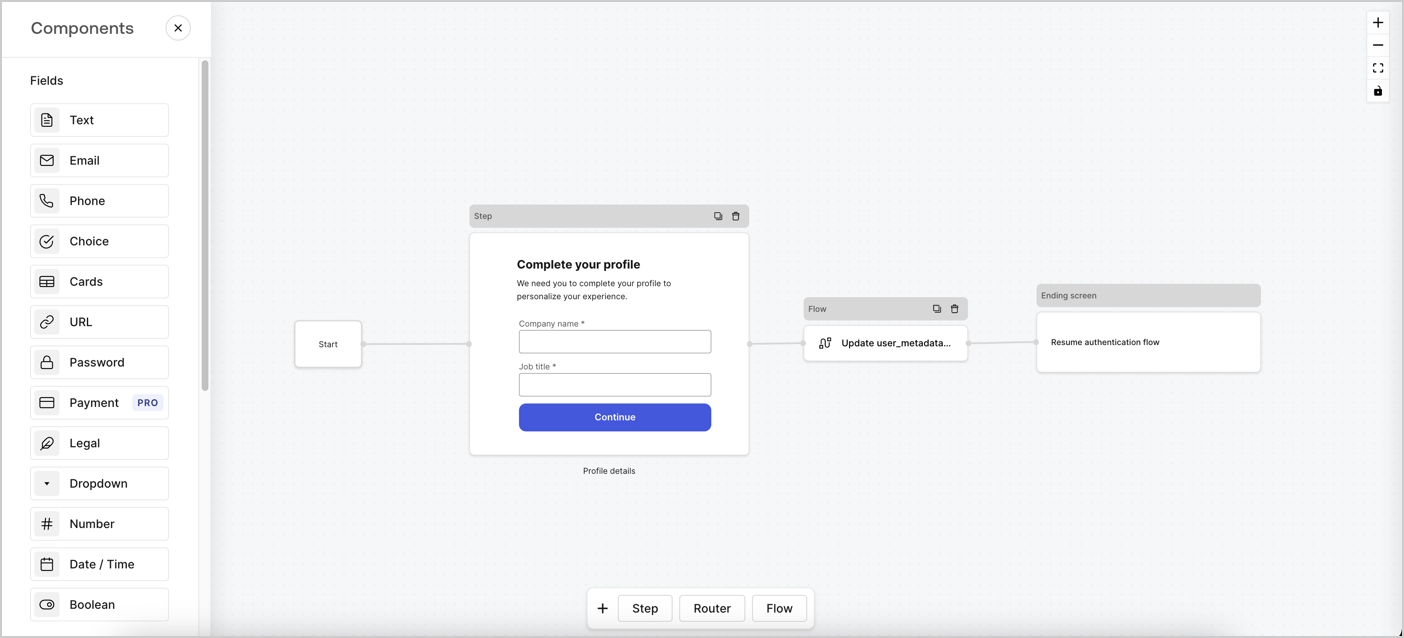
Forms for Actions allows you to create progressive profiling flows to decide when to prompt users to collect missing information, such as company name and job title, and store them as `user_metadata` attributes.
<Frame>
  <img src="https://mintcdn.com/docs-dev-docs-free-tenant-inactivity-policy/tMMTLw_XFpeXRMhq/docs/images/cdy7uua7fh8z/xUx9YmnHvnAqL19JvNtNP/60dae88f893d4ebe8e3523421e960596/Progressive-profle-overview.png?fit=max&auto=format&n=tMMTLw_XFpeXRMhq&q=85&s=df8d799b0af705f8c5fd0b303be602e2" alt="Dashboard > Actions > Forms > Form" data-og-width="1404" width="1404" data-og-height="638" height="638" data-path="docs/images/cdy7uua7fh8z/xUx9YmnHvnAqL19JvNtNP/60dae88f893d4ebe8e3523421e960596/Progressive-profle-overview.png" data-optimize="true" data-opv="3" srcset="https://mintcdn.com/docs-dev-docs-free-tenant-inactivity-policy/tMMTLw_XFpeXRMhq/docs/images/cdy7uua7fh8z/xUx9YmnHvnAqL19JvNtNP/60dae88f893d4ebe8e3523421e960596/Progressive-profle-overview.png?w=280&fit=max&auto=format&n=tMMTLw_XFpeXRMhq&q=85&s=7c821e175fd31210edaefeecd784ae09 280w, https://mintcdn.com/docs-dev-docs-free-tenant-inactivity-policy/tMMTLw_XFpeXRMhq/docs/images/cdy7uua7fh8z/xUx9YmnHvnAqL19JvNtNP/60dae88f893d4ebe8e3523421e960596/Progressive-profle-overview.png?w=560&fit=max&auto=format&n=tMMTLw_XFpeXRMhq&q=85&s=8e3857adf6c9e7f23f85da03ff468bef 560w, https://mintcdn.com/docs-dev-docs-free-tenant-inactivity-policy/tMMTLw_XFpeXRMhq/docs/images/cdy7uua7fh8z/xUx9YmnHvnAqL19JvNtNP/60dae88f893d4ebe8e3523421e960596/Progressive-profle-overview.png?w=840&fit=max&auto=format&n=tMMTLw_XFpeXRMhq&q=85&s=ff6f4eca3e3796e5b6c310ce2db4a491 840w, https://mintcdn.com/docs-dev-docs-free-tenant-inactivity-policy/tMMTLw_XFpeXRMhq/docs/images/cdy7uua7fh8z/xUx9YmnHvnAqL19JvNtNP/60dae88f893d4ebe8e3523421e960596/Progressive-profle-overview.png?w=1100&fit=max&auto=format&n=tMMTLw_XFpeXRMhq&q=85&s=c9fbfe398347ef04d566441fe605973b 1100w, https://mintcdn.com/docs-dev-docs-free-tenant-inactivity-policy/tMMTLw_XFpeXRMhq/docs/images/cdy7uua7fh8z/xUx9YmnHvnAqL19JvNtNP/60dae88f893d4ebe8e3523421e960596/Progressive-profle-overview.png?w=1650&fit=max&auto=format&n=tMMTLw_XFpeXRMhq&q=85&s=36d3b2839276f7ba32ac8ae1bd21d4be 1650w, https://mintcdn.com/docs-dev-docs-free-tenant-inactivity-policy/tMMTLw_XFpeXRMhq/docs/images/cdy7uua7fh8z/xUx9YmnHvnAqL19JvNtNP/60dae88f893d4ebe8e3523421e960596/Progressive-profle-overview.png?w=2500&fit=max&auto=format&n=tMMTLw_XFpeXRMhq&q=85&s=20756138e137eb235f716c4fb9bdec8c 2500w" />
</Frame>

The sections below outline how you can create a progressive profile form using nodes and flows, along with steps for adding your form to a [Post Login Action](/docs/customize/actions/explore-triggers/signup-and-login-triggers/login-trigger).

## Create a form from scratch

Follow these steps to create a form to gather information:

1. Open the Form editor by selecting **Auth0 Dashboard > Actions > Forms.**
2. Select **Create Form** > **Start from scratch**.

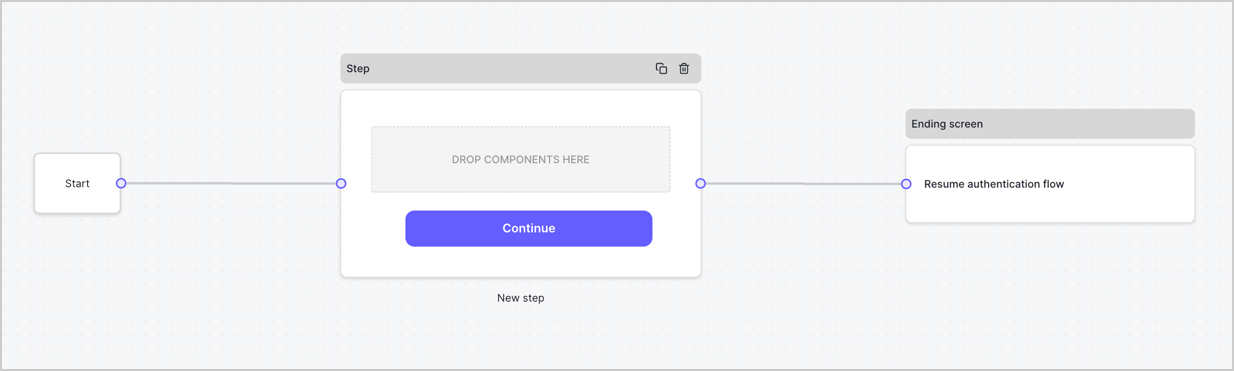
By default, a new form contains a Start node, a Step node, and an Ending screen node.
<Frame>
  <img src="https://mintcdn.com/docs-dev-docs-free-tenant-inactivity-policy/F28HqXaq-fHcjHSN/docs/images/cdy7uua7fh8z/2TZ9jSjgEcARFpULI6hz4R/a4319a1bd482f2ee5cc23100fdb2f42c/New-form-Forms-for-action-use-case.png?fit=max&auto=format&n=F28HqXaq-fHcjHSN&q=85&s=6e4886e9a9589053a8cf7684acd9ba5b" alt="Dashboard > Forms > Use Cases > Form" data-og-width="1234" width="1234" data-og-height="371" height="371" data-path="docs/images/cdy7uua7fh8z/2TZ9jSjgEcARFpULI6hz4R/a4319a1bd482f2ee5cc23100fdb2f42c/New-form-Forms-for-action-use-case.png" data-optimize="true" data-opv="3" srcset="https://mintcdn.com/docs-dev-docs-free-tenant-inactivity-policy/F28HqXaq-fHcjHSN/docs/images/cdy7uua7fh8z/2TZ9jSjgEcARFpULI6hz4R/a4319a1bd482f2ee5cc23100fdb2f42c/New-form-Forms-for-action-use-case.png?w=280&fit=max&auto=format&n=F28HqXaq-fHcjHSN&q=85&s=d211e288bd61d23134e5c40e4f714381 280w, https://mintcdn.com/docs-dev-docs-free-tenant-inactivity-policy/F28HqXaq-fHcjHSN/docs/images/cdy7uua7fh8z/2TZ9jSjgEcARFpULI6hz4R/a4319a1bd482f2ee5cc23100fdb2f42c/New-form-Forms-for-action-use-case.png?w=560&fit=max&auto=format&n=F28HqXaq-fHcjHSN&q=85&s=dd85415b560566573accdcad2348a69e 560w, https://mintcdn.com/docs-dev-docs-free-tenant-inactivity-policy/F28HqXaq-fHcjHSN/docs/images/cdy7uua7fh8z/2TZ9jSjgEcARFpULI6hz4R/a4319a1bd482f2ee5cc23100fdb2f42c/New-form-Forms-for-action-use-case.png?w=840&fit=max&auto=format&n=F28HqXaq-fHcjHSN&q=85&s=562645fd911609458db89fc66d5187c0 840w, https://mintcdn.com/docs-dev-docs-free-tenant-inactivity-policy/F28HqXaq-fHcjHSN/docs/images/cdy7uua7fh8z/2TZ9jSjgEcARFpULI6hz4R/a4319a1bd482f2ee5cc23100fdb2f42c/New-form-Forms-for-action-use-case.png?w=1100&fit=max&auto=format&n=F28HqXaq-fHcjHSN&q=85&s=538316f39f458eeb670dbddf809efb60 1100w, https://mintcdn.com/docs-dev-docs-free-tenant-inactivity-policy/F28HqXaq-fHcjHSN/docs/images/cdy7uua7fh8z/2TZ9jSjgEcARFpULI6hz4R/a4319a1bd482f2ee5cc23100fdb2f42c/New-form-Forms-for-action-use-case.png?w=1650&fit=max&auto=format&n=F28HqXaq-fHcjHSN&q=85&s=d95b5e1c067872b9102f14bc26a2374e 1650w, https://mintcdn.com/docs-dev-docs-free-tenant-inactivity-policy/F28HqXaq-fHcjHSN/docs/images/cdy7uua7fh8z/2TZ9jSjgEcARFpULI6hz4R/a4319a1bd482f2ee5cc23100fdb2f42c/New-form-Forms-for-action-use-case.png?w=2500&fit=max&auto=format&n=F28HqXaq-fHcjHSN&q=85&s=a42e1fa0cf131954ac66cbd909d2ca2a 2500w" />
</Frame>

### Configure the Step node

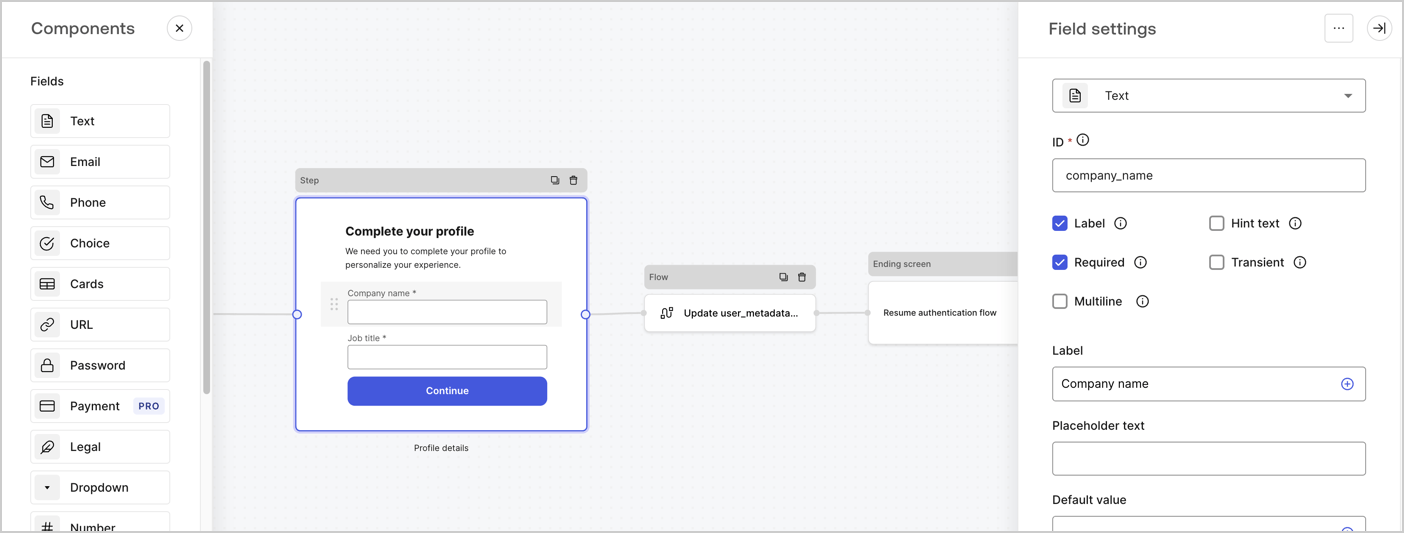
The Step node is the graphical interface visible to users. Add [Fields](/docs/customize/forms/nodes-and-components) to the Step node to collect the user's company name and job title values by following these steps:

1. Drag a **Rich text** field from the **Components menu** into the **Step** node.

   * **Rich text**: Enter a custom message.

     * **Example**: `Complete your profile! We need you to complete your profile to personalize your experience.`
   * Select **Save**.
2. Drag a **Text** field into the **Step** node.

   * **ID**: Enter `company_name`.
   * **Label**: Enable the checkbox.
   * **Label**: Enter `Company name`.
   * **Required**: Enable the checkbox.
   * Select **Save**.
3. Drag a **Text** field into the **Step** node.

   1. **ID**: Enter `job_title`.
   2. **Label**: Enter `Job title`.
   3. **Label**: Enable the checkbox.
   4. **Required**: Enable the checkbox.
   5. Select **Save**.
4. Select **Publish** to save.
<Frame>
  <img src="https://mintcdn.com/docs-dev-docs-free-tenant-inactivity-policy/EMBRM6bYnT1287YM/docs/images/cdy7uua7fh8z/6H1lRzwKyYioQyQJ9MtIoM/aa248e92fc028a68a5b92ff361a11644/progressive-profile-step.png?fit=max&auto=format&n=EMBRM6bYnT1287YM&q=85&s=342ead2f3ce665323be2d04e6446a180" alt="Dashboard > Actions > Forms > Form > Step node" data-og-width="1404" width="1404" data-og-height="533" height="533" data-path="docs/images/cdy7uua7fh8z/6H1lRzwKyYioQyQJ9MtIoM/aa248e92fc028a68a5b92ff361a11644/progressive-profile-step.png" data-optimize="true" data-opv="3" srcset="https://mintcdn.com/docs-dev-docs-free-tenant-inactivity-policy/EMBRM6bYnT1287YM/docs/images/cdy7uua7fh8z/6H1lRzwKyYioQyQJ9MtIoM/aa248e92fc028a68a5b92ff361a11644/progressive-profile-step.png?w=280&fit=max&auto=format&n=EMBRM6bYnT1287YM&q=85&s=b7a932ccf1f65b58dba9d3769b9b9d99 280w, https://mintcdn.com/docs-dev-docs-free-tenant-inactivity-policy/EMBRM6bYnT1287YM/docs/images/cdy7uua7fh8z/6H1lRzwKyYioQyQJ9MtIoM/aa248e92fc028a68a5b92ff361a11644/progressive-profile-step.png?w=560&fit=max&auto=format&n=EMBRM6bYnT1287YM&q=85&s=a1c095d9f331df1a6353f3e157f973e2 560w, https://mintcdn.com/docs-dev-docs-free-tenant-inactivity-policy/EMBRM6bYnT1287YM/docs/images/cdy7uua7fh8z/6H1lRzwKyYioQyQJ9MtIoM/aa248e92fc028a68a5b92ff361a11644/progressive-profile-step.png?w=840&fit=max&auto=format&n=EMBRM6bYnT1287YM&q=85&s=cb2e24102ab6dc660e8e311a0389c54a 840w, https://mintcdn.com/docs-dev-docs-free-tenant-inactivity-policy/EMBRM6bYnT1287YM/docs/images/cdy7uua7fh8z/6H1lRzwKyYioQyQJ9MtIoM/aa248e92fc028a68a5b92ff361a11644/progressive-profile-step.png?w=1100&fit=max&auto=format&n=EMBRM6bYnT1287YM&q=85&s=56780d3e805945a3e30a23f93386d9cd 1100w, https://mintcdn.com/docs-dev-docs-free-tenant-inactivity-policy/EMBRM6bYnT1287YM/docs/images/cdy7uua7fh8z/6H1lRzwKyYioQyQJ9MtIoM/aa248e92fc028a68a5b92ff361a11644/progressive-profile-step.png?w=1650&fit=max&auto=format&n=EMBRM6bYnT1287YM&q=85&s=a825f1de644c6a1c469cde770cb22cd2 1650w, https://mintcdn.com/docs-dev-docs-free-tenant-inactivity-policy/EMBRM6bYnT1287YM/docs/images/cdy7uua7fh8z/6H1lRzwKyYioQyQJ9MtIoM/aa248e92fc028a68a5b92ff361a11644/progressive-profile-step.png?w=2500&fit=max&auto=format&n=EMBRM6bYnT1287YM&q=85&s=b4385666e340538ae208a4e7b54bf5bd 2500w" />
</Frame>

### Configure the flow node

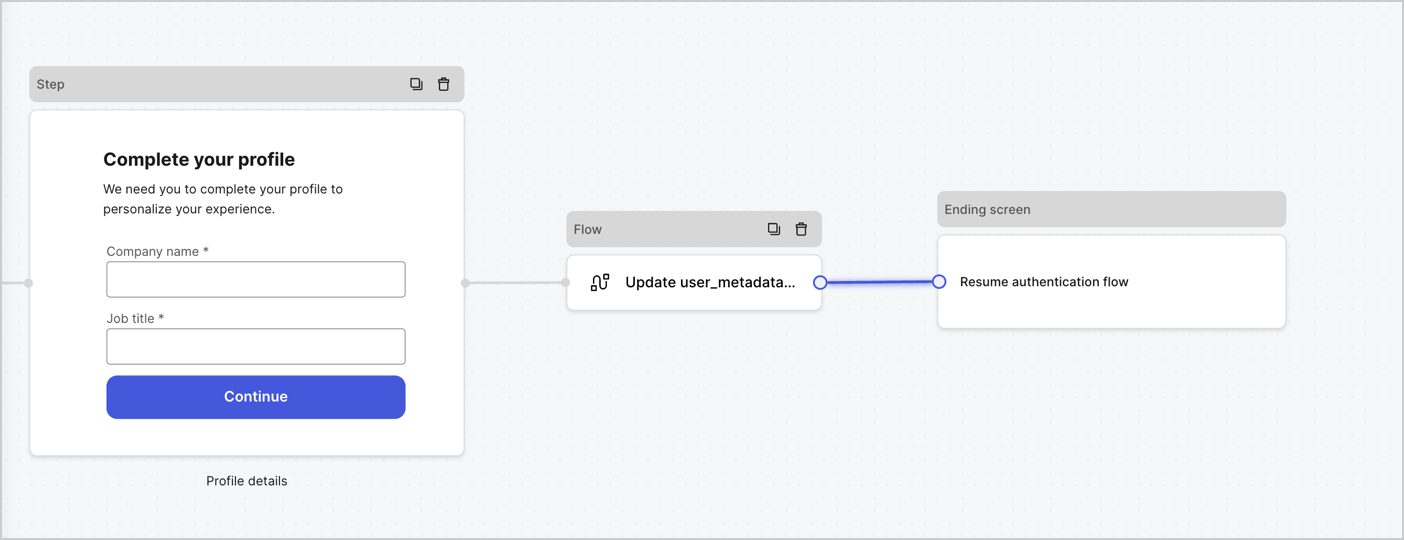
Add a **Flow** node after the **Step** node to update the `user_metadata` and resume the authentication flow by following these steps:

1. Select **Flow** from the bottom of the Form editor.
2. Remove the existing link between the **Step** and **Ending Screen** nodes.
3. Select the new **Flow** > **Click to add a flow** > **Create a new flow.**

   * Enter `Update user_metadata` in the **Name** field.
   * Select **Create**.
   * Select **Save**.
4. Link the **Flow** node to the **Step** and **Ending Screen** nodes as pictured below.
5. Select **Publish** to save.
<Frame>
  <img src="https://mintcdn.com/docs-dev-docs-free-tenant-inactivity-policy/RoxqrnEFVW4t01Ul/docs/images/cdy7uua7fh8z/5C91DaWn4LGtJT9BF87ssu/095171d0c452a287c44bfde12fd6d13f/link-nodes.png?fit=max&auto=format&n=RoxqrnEFVW4t01Ul&q=85&s=7d7e3d1ab29034688656e0d5f6964876" alt="Dashboard > Actions > Forms > Form" data-og-width="1404" width="1404" data-og-height="540" height="540" data-path="docs/images/cdy7uua7fh8z/5C91DaWn4LGtJT9BF87ssu/095171d0c452a287c44bfde12fd6d13f/link-nodes.png" data-optimize="true" data-opv="3" srcset="https://mintcdn.com/docs-dev-docs-free-tenant-inactivity-policy/RoxqrnEFVW4t01Ul/docs/images/cdy7uua7fh8z/5C91DaWn4LGtJT9BF87ssu/095171d0c452a287c44bfde12fd6d13f/link-nodes.png?w=280&fit=max&auto=format&n=RoxqrnEFVW4t01Ul&q=85&s=cc3e071a746fdf3b561ffdfb5aab1666 280w, https://mintcdn.com/docs-dev-docs-free-tenant-inactivity-policy/RoxqrnEFVW4t01Ul/docs/images/cdy7uua7fh8z/5C91DaWn4LGtJT9BF87ssu/095171d0c452a287c44bfde12fd6d13f/link-nodes.png?w=560&fit=max&auto=format&n=RoxqrnEFVW4t01Ul&q=85&s=fd5edb8e50604ed7cda97dd8274edd5d 560w, https://mintcdn.com/docs-dev-docs-free-tenant-inactivity-policy/RoxqrnEFVW4t01Ul/docs/images/cdy7uua7fh8z/5C91DaWn4LGtJT9BF87ssu/095171d0c452a287c44bfde12fd6d13f/link-nodes.png?w=840&fit=max&auto=format&n=RoxqrnEFVW4t01Ul&q=85&s=a30300ac9269e6ce4a984ca3f412cc9b 840w, https://mintcdn.com/docs-dev-docs-free-tenant-inactivity-policy/RoxqrnEFVW4t01Ul/docs/images/cdy7uua7fh8z/5C91DaWn4LGtJT9BF87ssu/095171d0c452a287c44bfde12fd6d13f/link-nodes.png?w=1100&fit=max&auto=format&n=RoxqrnEFVW4t01Ul&q=85&s=db1db192d6e65ff32c2b8166931bfe41 1100w, https://mintcdn.com/docs-dev-docs-free-tenant-inactivity-policy/RoxqrnEFVW4t01Ul/docs/images/cdy7uua7fh8z/5C91DaWn4LGtJT9BF87ssu/095171d0c452a287c44bfde12fd6d13f/link-nodes.png?w=1650&fit=max&auto=format&n=RoxqrnEFVW4t01Ul&q=85&s=c79a486c8d81b36250d3a037b23ce7e3 1650w, https://mintcdn.com/docs-dev-docs-free-tenant-inactivity-policy/RoxqrnEFVW4t01Ul/docs/images/cdy7uua7fh8z/5C91DaWn4LGtJT9BF87ssu/095171d0c452a287c44bfde12fd6d13f/link-nodes.png?w=2500&fit=max&auto=format&n=RoxqrnEFVW4t01Ul&q=85&s=d0bd31d7ac78f2e37878ff6779834568 2500w" />
</Frame>

Add an Auth0 Update user action to the flow by following these steps:

1. Select the **Update user\_metadata** flow, then select the **Edit Flow** to open the Flow editor in a new tab.
2. Below the **Start** action, select the **+** icon to add an **Update user** action. Complete the fields below, then select **Save** to continue.

   * **Connection**: Select from the dropdown the Vault connection to your M2M application.

   * **User ID**: Enter `{{context.user.user_id}}`.

   * **Body**: Copy and paste the following code to update the user\_metadata with `job_title` and `company_name` properties.

     ```json lines theme={null}
     {
        "user_metadata": {
           "job_title": "{{fields.job_title}}",
           "company_name": "{{fields.company_name}}"
        }
     }
     ```

   * Select **Save**.
3. Select **Publish** to save.

<Frame>
  <img src="https://mintcdn.com/docs-dev-docs-free-tenant-inactivity-policy/6MdNV0_b-iNkLX_B/docs/images/cdy7uua7fh8z/65Jx4W5oIZJyyvA8z4HqIx/0661b1a8ca6361c54fc4fef07ba59f0b/update-user.png?fit=max&auto=format&n=6MdNV0_b-iNkLX_B&q=85&s=58c7b380643972554b1d155de078d297" alt="Dashboard > Actions > Forms > Flows" data-og-width="1404" width="1404" data-og-height="244" height="244" data-path="docs/images/cdy7uua7fh8z/65Jx4W5oIZJyyvA8z4HqIx/0661b1a8ca6361c54fc4fef07ba59f0b/update-user.png" data-optimize="true" data-opv="3" srcset="https://mintcdn.com/docs-dev-docs-free-tenant-inactivity-policy/6MdNV0_b-iNkLX_B/docs/images/cdy7uua7fh8z/65Jx4W5oIZJyyvA8z4HqIx/0661b1a8ca6361c54fc4fef07ba59f0b/update-user.png?w=280&fit=max&auto=format&n=6MdNV0_b-iNkLX_B&q=85&s=a85d49314b1e3211aee09c839ab2e01e 280w, https://mintcdn.com/docs-dev-docs-free-tenant-inactivity-policy/6MdNV0_b-iNkLX_B/docs/images/cdy7uua7fh8z/65Jx4W5oIZJyyvA8z4HqIx/0661b1a8ca6361c54fc4fef07ba59f0b/update-user.png?w=560&fit=max&auto=format&n=6MdNV0_b-iNkLX_B&q=85&s=4a7e335be1ebaafb080cb7b923679d9c 560w, https://mintcdn.com/docs-dev-docs-free-tenant-inactivity-policy/6MdNV0_b-iNkLX_B/docs/images/cdy7uua7fh8z/65Jx4W5oIZJyyvA8z4HqIx/0661b1a8ca6361c54fc4fef07ba59f0b/update-user.png?w=840&fit=max&auto=format&n=6MdNV0_b-iNkLX_B&q=85&s=60d730ed850737708f3df4476957a30c 840w, https://mintcdn.com/docs-dev-docs-free-tenant-inactivity-policy/6MdNV0_b-iNkLX_B/docs/images/cdy7uua7fh8z/65Jx4W5oIZJyyvA8z4HqIx/0661b1a8ca6361c54fc4fef07ba59f0b/update-user.png?w=1100&fit=max&auto=format&n=6MdNV0_b-iNkLX_B&q=85&s=dcd8746220957dec2cfb8d1647200abc 1100w, https://mintcdn.com/docs-dev-docs-free-tenant-inactivity-policy/6MdNV0_b-iNkLX_B/docs/images/cdy7uua7fh8z/65Jx4W5oIZJyyvA8z4HqIx/0661b1a8ca6361c54fc4fef07ba59f0b/update-user.png?w=1650&fit=max&auto=format&n=6MdNV0_b-iNkLX_B&q=85&s=b90fe43d9d2d362ebeb1e95ec84ba6a4 1650w, https://mintcdn.com/docs-dev-docs-free-tenant-inactivity-policy/6MdNV0_b-iNkLX_B/docs/images/cdy7uua7fh8z/65Jx4W5oIZJyyvA8z4HqIx/0661b1a8ca6361c54fc4fef07ba59f0b/update-user.png?w=2500&fit=max&auto=format&n=6MdNV0_b-iNkLX_B&q=85&s=d288c18c6177f41a9ce0b32f05afdfcb 2500w" />
</Frame>

### Retrieve the form render code

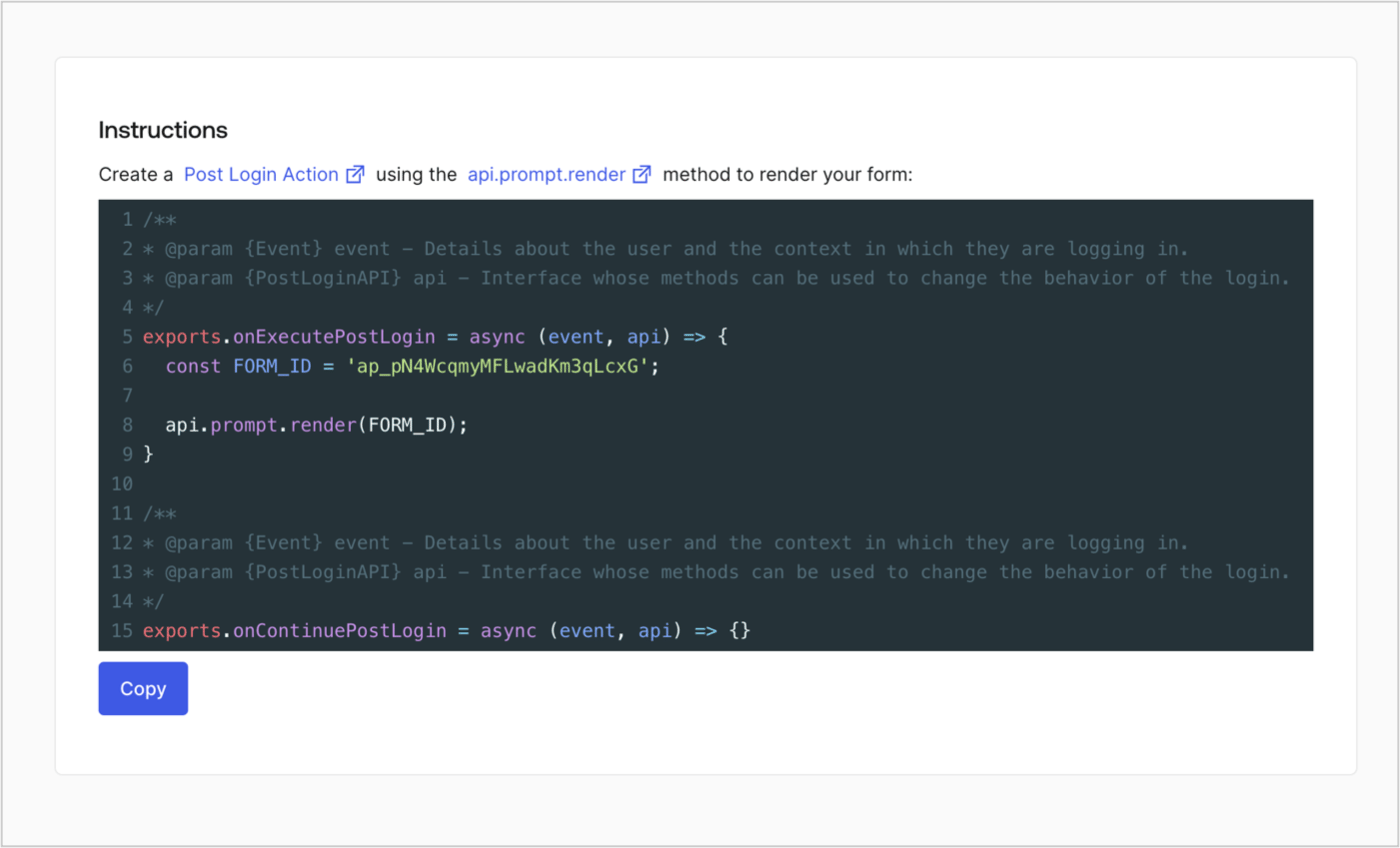
Retrieve the form render code to visually render the form with a custom Post Login Action by following these steps:

* From the Form editor, select **`<> Render`**.
* Select **Copy**.
<Frame>
  <img src="https://mintcdn.com/docs-dev-docs-free-tenant-inactivity-policy/2Ak17d_u3ODX3TIy/docs/images/cdy7uua7fh8z/2EIUzc539sq9lwoTKbjoJv/496a864c0fc44a782c9cadca119dbfb0/embed.png?fit=max&auto=format&n=2Ak17d_u3ODX3TIy&q=85&s=b618a9faa6eabef5a0400cb73f38cec1" alt="Dashboard > Actions > Forms > Form > Embed" data-og-width="1400" width="1400" data-og-height="848" height="848" data-path="docs/images/cdy7uua7fh8z/2EIUzc539sq9lwoTKbjoJv/496a864c0fc44a782c9cadca119dbfb0/embed.png" data-optimize="true" data-opv="3" srcset="https://mintcdn.com/docs-dev-docs-free-tenant-inactivity-policy/2Ak17d_u3ODX3TIy/docs/images/cdy7uua7fh8z/2EIUzc539sq9lwoTKbjoJv/496a864c0fc44a782c9cadca119dbfb0/embed.png?w=280&fit=max&auto=format&n=2Ak17d_u3ODX3TIy&q=85&s=57bfe307e9a97a922ddb236aee9e8056 280w, https://mintcdn.com/docs-dev-docs-free-tenant-inactivity-policy/2Ak17d_u3ODX3TIy/docs/images/cdy7uua7fh8z/2EIUzc539sq9lwoTKbjoJv/496a864c0fc44a782c9cadca119dbfb0/embed.png?w=560&fit=max&auto=format&n=2Ak17d_u3ODX3TIy&q=85&s=1ee3ec1ea10900b05fe5d846a533b36d 560w, https://mintcdn.com/docs-dev-docs-free-tenant-inactivity-policy/2Ak17d_u3ODX3TIy/docs/images/cdy7uua7fh8z/2EIUzc539sq9lwoTKbjoJv/496a864c0fc44a782c9cadca119dbfb0/embed.png?w=840&fit=max&auto=format&n=2Ak17d_u3ODX3TIy&q=85&s=31a11590441b11e9fdeba009cca608e6 840w, https://mintcdn.com/docs-dev-docs-free-tenant-inactivity-policy/2Ak17d_u3ODX3TIy/docs/images/cdy7uua7fh8z/2EIUzc539sq9lwoTKbjoJv/496a864c0fc44a782c9cadca119dbfb0/embed.png?w=1100&fit=max&auto=format&n=2Ak17d_u3ODX3TIy&q=85&s=b338eb1c7ab3e8c5ba0e46ea0c86c766 1100w, https://mintcdn.com/docs-dev-docs-free-tenant-inactivity-policy/2Ak17d_u3ODX3TIy/docs/images/cdy7uua7fh8z/2EIUzc539sq9lwoTKbjoJv/496a864c0fc44a782c9cadca119dbfb0/embed.png?w=1650&fit=max&auto=format&n=2Ak17d_u3ODX3TIy&q=85&s=8898fd60276947954aad80a00c2b0f89 1650w, https://mintcdn.com/docs-dev-docs-free-tenant-inactivity-policy/2Ak17d_u3ODX3TIy/docs/images/cdy7uua7fh8z/2EIUzc539sq9lwoTKbjoJv/496a864c0fc44a782c9cadca119dbfb0/embed.png?w=2500&fit=max&auto=format&n=2Ak17d_u3ODX3TIy&q=85&s=ceaec3407688f0e39f547ff54179bc29 2500w" />
</Frame>

## Create a Post Login Action

Create a post-login Action to render your form by following these steps:

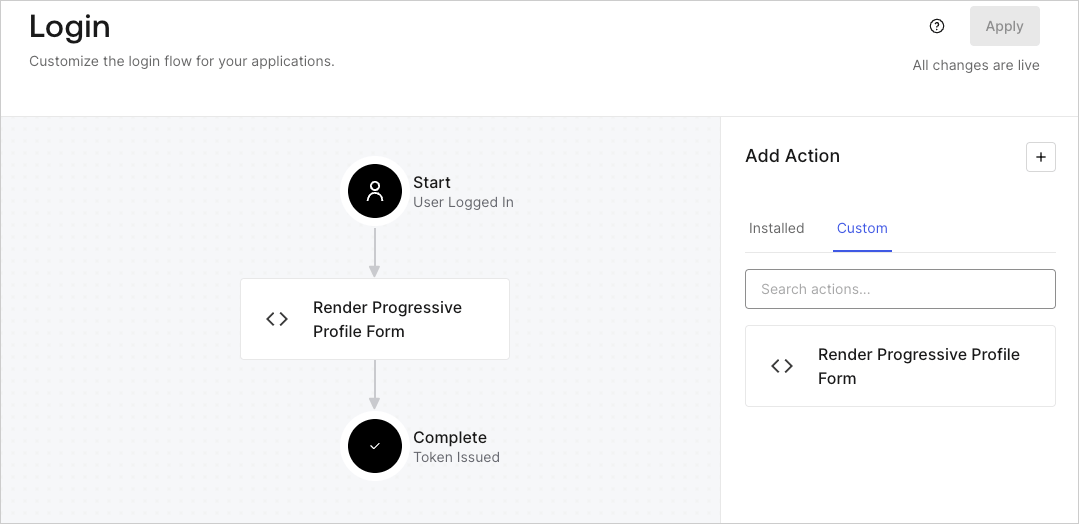
1. Navigate to **Auth0 Dashboard > Actions > Flows > Login.**
2. Select the **+** icon and select **Build from scratch**:

   * **Name**: Enter `Render Progressive Profile Form`.
   * **Trigger**: Select `Login / Post Login`.
   * **Runtime**: Select the recommended version.
3. Select **Create**.

To configure the post-login Action:

1. Delete the existing code from the Code editor.
2. Paste the form embed code into the Code editor.
3. Edit the code to define the conditional logic that will render the form.

   ```javascript lines theme={null}
   /**
   * @param {Event} event - Details about the user and the context in which they are logging in.
   * @param {PostLoginAPI} api - Interface whose methods can be used to change the behavior of the login.
   */
   exports.onExecutePostLogin = async (event, api) => {
     const FORM_ID = 'REPLACE_WITH_YOUR_FORM_ID';

     if (
       event.stats.logins_count > 2 &&
       !event.user.user_metadata.company_name &&
       !event.user.user_metadata.job_title
     ) {
       api.prompt.render(FORM_ID);
     }
   }

   exports.onContinuePostLogin = async (event, api) => { }
   ```

   <Callout icon="file-lines" color="#0EA5E9" iconType="regular">
     The example code above will render the form when a user has a login count > 2 and is missing the user metadata company\_name and job\_title properties.
   </Callout>
4. Select **Deploy.**
5. Drag and Drop the **Render Progressive Profile Form** Action to the **Login** flow.
   <Frame>
     <img src="https://mintcdn.com/docs-dev-docs-free-tenant-inactivity-policy/5q8_o0J_1fJpTlDK/docs/images/cdy7uua7fh8z/1QjjZdpTqTxx012UDN4xk9/99fba5ef4068a5688f1762eea7f42976/renderprogessiveprofile.png?fit=max&auto=format&n=5q8_o0J_1fJpTlDK&q=85&s=c1c0fe5544324e400bac58c5baffa640" alt="Dashboard > Forms > Use Cases Progressive Profile Login Action" data-og-width="1079" width="1079" data-og-height="524" height="524" data-path="docs/images/cdy7uua7fh8z/1QjjZdpTqTxx012UDN4xk9/99fba5ef4068a5688f1762eea7f42976/renderprogessiveprofile.png" data-optimize="true" data-opv="3" srcset="https://mintcdn.com/docs-dev-docs-free-tenant-inactivity-policy/5q8_o0J_1fJpTlDK/docs/images/cdy7uua7fh8z/1QjjZdpTqTxx012UDN4xk9/99fba5ef4068a5688f1762eea7f42976/renderprogessiveprofile.png?w=280&fit=max&auto=format&n=5q8_o0J_1fJpTlDK&q=85&s=33050cdd39c13b677128c45090a90458 280w, https://mintcdn.com/docs-dev-docs-free-tenant-inactivity-policy/5q8_o0J_1fJpTlDK/docs/images/cdy7uua7fh8z/1QjjZdpTqTxx012UDN4xk9/99fba5ef4068a5688f1762eea7f42976/renderprogessiveprofile.png?w=560&fit=max&auto=format&n=5q8_o0J_1fJpTlDK&q=85&s=4aae5c7dafb2f42fd980089d4200c595 560w, https://mintcdn.com/docs-dev-docs-free-tenant-inactivity-policy/5q8_o0J_1fJpTlDK/docs/images/cdy7uua7fh8z/1QjjZdpTqTxx012UDN4xk9/99fba5ef4068a5688f1762eea7f42976/renderprogessiveprofile.png?w=840&fit=max&auto=format&n=5q8_o0J_1fJpTlDK&q=85&s=ed2ef146f47c1d540d74050ee47c5e7d 840w, https://mintcdn.com/docs-dev-docs-free-tenant-inactivity-policy/5q8_o0J_1fJpTlDK/docs/images/cdy7uua7fh8z/1QjjZdpTqTxx012UDN4xk9/99fba5ef4068a5688f1762eea7f42976/renderprogessiveprofile.png?w=1100&fit=max&auto=format&n=5q8_o0J_1fJpTlDK&q=85&s=f76a04295bbfcdc8ab3b650f658f2c9c 1100w, https://mintcdn.com/docs-dev-docs-free-tenant-inactivity-policy/5q8_o0J_1fJpTlDK/docs/images/cdy7uua7fh8z/1QjjZdpTqTxx012UDN4xk9/99fba5ef4068a5688f1762eea7f42976/renderprogessiveprofile.png?w=1650&fit=max&auto=format&n=5q8_o0J_1fJpTlDK&q=85&s=8c2a7c851c0d9c327977f2b21809dcef 1650w, https://mintcdn.com/docs-dev-docs-free-tenant-inactivity-policy/5q8_o0J_1fJpTlDK/docs/images/cdy7uua7fh8z/1QjjZdpTqTxx012UDN4xk9/99fba5ef4068a5688f1762eea7f42976/renderprogessiveprofile.png?w=2500&fit=max&auto=format&n=5q8_o0J_1fJpTlDK&q=85&s=b2c1abf83295d1b733713c53ca02048a 2500w" />
   </Frame>
6. Select **Apply**.

### Test implementation

Test the implementation by following these steps:

1. Log in with an existing user whose login count is greater than 2 and their `user_metadata` attributes `company_name` and `job_title` have no values.
2. The post-login action in the Login flow will render the form and prompt for the information.
3. Select **Auth0 Dashboard > User Management > Users,** locate the user and verify that the `user_metadata` attributes `company_name` and `job_title` contain information.
